


TL;DR – Summary:
- Best for service businesses that need CRM + marketing automation + payments in one place
- Single plan at ~$249–$299/mo (billed annually) + a mandatory ~$499 onboarding fee
- Acquired by Thryv Holdings in 2024 for $80M – product roadmap is uncertain
- Trustpilot: 1.1/5 (493 reviews). G2: 3.9/5. The gap is real and worth understanding
- Free trial: no. Free plan: no.
Keap at a glance
Score table
| Category | Score | Notes |
|---|---|---|
| Usability | 3 / 5 | Quick setup, but the UI is showing its age |
| Automation | 4 / 5 | Genuinely strong visual campaign builder |
| Value for money | 2.5 / 5 | Expensive for what you get at this price point |
| Features | 3.5 / 5 | Comprehensive all-in-one, but not best-in-class in any single area |
| Customer support | 3 / 5 | Available, but billing complaints are a red flag |
| Overall | 3.2 / 5 |
The one-sentence verdict
Keap is the right CRM if you’re a service business owner with complex follow-up sequences to automate – and the wrong one if you haven’t committed to that use case yet.
What is Keap CRM?
Keap is an all-in-one platform that combines CRM, email marketing automation, payment processing, appointment booking, and a dedicated business phone line. It’s built for small service businesses: think coaches, consultants, marketing agencies, contractors, and anyone who needs to capture a lead and then follow up relentlessly until they convert.
If you’ve heard of Infusionsoft, that’s the same product. The company rebranded from Infusionsoft to Keap in 2019, partly to shake the reputation that Infusionsoft was too complex for most small businesses. Whether Keap succeeded at that is debatable – the platform still has a serious learning curve – but the name change stuck.
The core pitch: instead of stitching together a CRM, an email tool, and a payment processor, Keap handles all three under one roof. For the right business, that’s genuinely valuable. For everyone else, you’re paying for features you won’t use.
From Infusionsoft to Keap to Thryv: what the acquisition means for you
Here’s what the rest of the Keap review landscape isn’t telling you.
In 2024, Thryv Holdings acquired Keap for $80 million. That price raised eyebrows immediately – it was reportedly below Keap’s annual revenue, which is an unusual signal in SaaS acquisitions. Below-ARR pricing generally means the acquirer is picking up a distressed or stagnating asset, not a growth rocket.
Thryv is a publicly traded SMB software company (NASDAQ: THRY). Their core business is local business management tools: appointment booking, reputation management, listings. Keap fits their SMB portfolio thesis, but the strategic overlap isn’t obvious. Thryv isn’t a CRM company.
What this means in practice: the product still works. Keap’s automation builder, contact management, and billing infrastructure are all operational. But feature investment is an open question. If you’re evaluating Keap for a long-term CRM decision, the Thryv acquisition adds a layer of uncertainty you’d want to weigh against the alternatives.
If you’re already on Keap and migrating sounds painful, the calculus is different – the platform isn’t shutting down tomorrow. But if you’re starting fresh, the uncertainty matters.
Keap core features
CRM and contact management
Keap’s CRM is built around individual contact records. Each contact gets a full timeline: emails sent, automations triggered, tasks assigned, payments made, and notes added. The tagging system is genuinely flexible – you can segment contacts by any combination of tags, which powers the automation logic downstream.
Pipeline management is functional but basic. You get customizable stages and can drag-and-drop deals between them. It’s closer to Pipedrive circa 2017 than Pipedrive today – it works, but it’s not where Keap’s strength is.
Lead scoring is included. You set point values for behaviors (opened email, clicked link, visited page), and Keap tracks the score over time. Useful if you’re running nurture sequences and want to prioritize warm leads for outreach.
The contact import process is clean. CSV imports are straightforward, and the field mapping works as expected.
Marketing automation and campaign builder
This is the best thing Keap does.
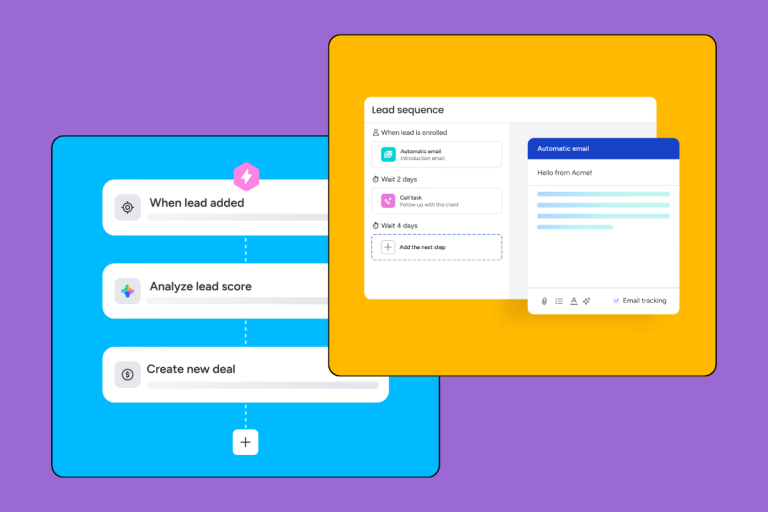
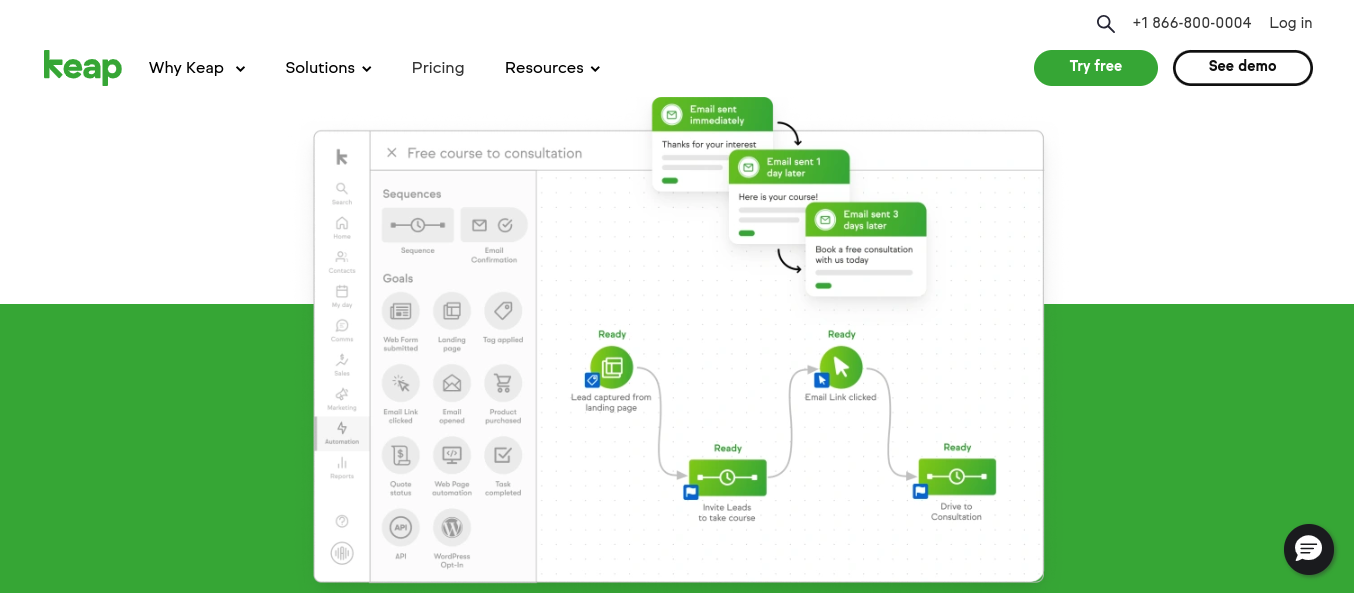
The campaign builder uses a visual drag-and-drop interface where you map out the sequence: trigger → action → condition → next action. Email sent, tag applied, wait 3 days, if opened → send follow-up A, if not → send follow-up B. Repeat as needed.
It handles multi-path sequences without collapsing into chaos. We’ve seen automation builders in tools half Keap’s price that fall apart once you get beyond a three-step sequence. Keap handles complexity reasonably well.
Email templates are workable. Not beautiful by modern standards, but functional. The drag-and-drop email builder covers the basics, and you can send A/B variations.
One legitimate complaint from real users: building an automation from scratch takes time. The first few campaigns feel like learning to drive a new car. Once you have a few sequences built, subsequent ones are faster. But if you’re expecting to clone a competitor’s Klaviyo flow in an afternoon, temper expectations.
E-commerce and payments
Keap has built-in payment processing through a native integration with Stripe (and previously their own payment gateway). You can create order forms, sell products and services directly, and collect one-time or recurring payments without a separate tool.
For a coach selling a $2,000 program or a contractor collecting a deposit before starting a job, this is genuinely useful. The payment is tied directly to the contact record, which triggers automations (payment received → send onboarding sequence). That kind of tight integration is harder to replicate if you’re cobbling together separate tools.
The e-commerce side isn’t Shopify – don’t mistake it for one. It’s for services, not complex product catalogs. If you’re selling physical goods at scale, look elsewhere.
Dedicated business phone line
Keap includes a dedicated US business phone number for calls and text messages. You make and receive calls through the Keap app, and text messages to contacts are logged in the contact record.
It’s useful for the same audience who loves the rest of Keap: service businesses that communicate with clients primarily over the phone. Not every CRM offers this natively, and setting it up as a separate VoIP integration elsewhere is its own headache.
Note: outbound SMS volume is priced separately as a bundle (more on this in the pricing section). The line itself is included; the texts are not unlimited.
Ease of use
Keap markets itself as quick to set up, and on that specific point, they’re not wrong. The initial setup – importing contacts, connecting your email, setting up your first pipeline – takes an afternoon, not a week.
The ongoing experience is more complicated. The interface was last overhauled around 2018. If you’re coming from HubSpot, Pipedrive, or any CRM built in the last three years, you’ll notice. Navigation isn’t always intuitive, and finding a specific setting sometimes involves clicking through menus that don’t quite follow the logic you’d expect.
The automation builder gets easier with use, but the first few automations will take longer than you think.
The mobile app handles the basics – looking up contacts, logging calls, checking tasks – but it’s not where you’d want to build anything complex. Desktop is the primary environment.
How much does Keap cost?
Here’s where we need to be direct with you: pricing sources conflict, and we’d rather flag that than paper over it.
Keap runs a single plan (no feature-gated tiers, which is actually a good thing). According to a PAA snippet from a recent SERP, the plan runs $299/month billed annually ($2,988/year). Business.com, a review site that covers Keap regularly, reports $249/month. Keap has quietly updated their pricing multiple times in the past two years, so verify current pricing at keap.com before committing.
What’s included in the base plan
| Item | Included |
|---|---|
| Users | 2 |
| Contacts | 1,500 |
| CRM | Yes |
| Marketing automation | Yes |
| Email campaigns | Yes |
| Landing pages | Yes |
| E-commerce / payments | Yes |
| Business phone line | Yes |
| Appointment scheduling | Yes |
| All features | Yes (no tier-gating) |
No feature tiers is genuinely good news. You’re not buying a plan only to discover the automation you actually need is locked behind a Pro tier.
Add-on costs to watch out for
Onboarding fee: ~$499, one-time, mandatory. This isn’t optional. Keap requires you to go through a coaching kickstart session. For some buyers, this is useful. For experienced CRM users, it’s an unavoidable tax.
Additional users: approximately $10/user/month beyond the 2 included.
Contact overages: you’ll pay extra for each block of contacts beyond your plan’s limit. If your list grows past 1,500, those additional costs add up.
SMS bundles: text messaging is not included in the base price. You buy bundles of outbound texts on top of your monthly subscription.
The all-in cost for a two-person service business with a 3,000-contact list and moderate SMS use could easily exceed $400/month once you factor in overages and add-ons. Compare that to GoHighLevel at $97/month (two users, unlimited contacts) or ActiveCampaign at ~$100/month for comparable automation.
Who should use Keap?
Best fit: service businesses, coaches, and solo salespeople
Keap was built for a specific buyer. If you match any of the below, it’s worth a real look:
- Service businesses (consultants, coaches, therapists, contractors) with multi-touch follow-up sequences
- Businesses that want to collect payments without bolting on a separate Stripe or Square integration
- Existing Infusionsoft users who don’t want the migration headache
- Sales-heavy solopreneurs with a complex nurture flow and 200–1,500 contacts to manage
- Anyone who’s already tried simpler CRMs and found them too limited for automation needs
The sweet spot is a business where the sales cycle involves multiple touchpoints, where leads come in through a form or call, and where the goal is to automate the follow-up from day one.
Poor fit: enterprise teams, budget buyers, and simple CRM needs
Don’t use Keap if:
- You need more than 2–3 users on a budget (the per-user add-on cost scales fast)
- Your CRM needs are basic – a simple contact list and some notes don’t justify $299/month
- You’re a B2B sales team that lives in a pipeline view (Pipedrive does this better and cheaper)
- You need deep integrations with enterprise tools (Salesforce, Marketo, complex ERP systems)
- You’re price-sensitive and haven’t validated your sales process yet – start with HubSpot’s free CRM
Keap alternatives
Keap vs HubSpot
HubSpot has a free CRM tier. Keap has nothing free. That alone rules out Keap for anyone starting out or cost-testing their stack.
At Keap’s $299/month price point, HubSpot’s Sales Hub or Marketing Hub gives you significantly more, especially for marketing-heavy teams: better email analytics, stronger integrations, and a product that’s actively invested in. HubSpot also has much higher G2 ratings and far fewer billing complaints.
Choose Keap over HubSpot if you specifically need the built-in payment processing + automation combination and you find HubSpot’s pricing structure (which charges per contact and per user at higher tiers) actually more expensive for your use case. For most buyers, HubSpot wins.
See our HubSpot review for the full comparison.
Keap vs ActiveCampaign
ActiveCampaign is the closest true competitor to Keap on automation depth. The email and automation builder is comparable – some would argue better. And it starts from $29/month, which makes the gap with Keap hard to justify on automation features alone.
ActiveCampaign doesn’t have built-in payments or a business phone line. If those matter, Keap has the edge. If you just need powerful email + CRM automation, ActiveCampaign gives you 80% of what Keap does at 20–30% of the price.
Choose Keap over ActiveCampaign if the all-in-one pitch matters – payments, phone, CRM, automation under one login.
See our ActiveCampaign review for the full breakdown.
Keap vs GoHighLevel
This is the comparison Keap probably doesn’t want you making.
GoHighLevel (GHL) starts at $97/month, includes unlimited contacts, 3 users, a funnel builder, reputation management, appointment scheduling, and everything Keap does – plus white-labeling for agencies. It was built specifically to disrupt the same audience Keap targets: service businesses and marketing agencies.
GoHighLevel has its own learning curve, and the interface isn’t perfect. But for a growing service business or agency that wants the same automation-heavy approach as Keap without the price tag, it’s a serious contender.
Choose Keap over GoHighLevel if you’re already deeply embedded in the Keap/Infusionsoft ecosystem, have existing automations you’d need to rebuild, or specifically value Keap’s product maturity and support track record (such as it is) over GoHighLevel’s faster-moving but sometimes rougher platform.
Pros and cons
Pros:
- Powerful visual automation builder – one of the better ones in the SMB segment
- Built-in payment processing tied directly to contact records
- All features included in one plan (no feature-gating)
- Dedicated business phone line included
- Quick initial setup
- Strong tagging system for contact segmentation
Cons:
- Expensive – $249–$299/month plus mandatory ~$499 onboarding fee
- Only 2 users on the base plan; each additional user is extra
- 1,500 contact cap requires overages if your list grows
- Dated interface – noticeable vs modern CRMs built in the last three years
- Trustpilot: 1.1/5 from 493 reviews – the billing and cancellation complaints are consistent and worth reading
- Post-Thryv acquisition: product roadmap uncertainty
- No free plan or self-serve trial
Customer support
Keap offers phone, chat, and email support. The onboarding coaching session (the one you paid $499 for) is where most new users get their first proper introduction to the platform, and by most accounts it’s useful.
The quality of ongoing support is reported as adequate for technical questions. Where things fall apart – and where the Trustpilot reviews pile up – is billing and account management. Cancellation complaints are a consistent pattern: users reporting difficulty cancelling subscriptions, unexpected charges after cancellation, and slow billing resolution. These aren’t one-off incidents; the volume and consistency of the complaints across multiple review platforms suggests a systemic issue.
This doesn’t mean you’ll have a bad support experience. But go in with eyes open, document everything in writing, and understand the cancellation process before you sign up.
Our verdict
Keap is a mature platform with real strengths. The automation builder is genuinely impressive for an SMB tool, the all-in-one approach saves real integration pain for the right buyer, and the built-in payments angle is something competitors don’t match out of the box.
But the price is hard to defend at $299/month when GoHighLevel does the same job for $97/month and ActiveCampaign covers the automation angle for a fraction of the cost. The Thryv acquisition adds uncertainty – not a reason to panic, but a reason to note. And the Trustpilot reputation is bad enough that we’d tell you to read those reviews before committing, not after.
Choose Keap if: you’re already on Infusionsoft/Keap and rebuilding automations sounds worse than paying current pricing, or you specifically need the payment + CRM + automation combo and have the budget to justify it.
Skip Keap if: you’re starting fresh and haven’t locked in your CRM needs yet. The alternatives give you more room to experiment before you’re locked into a $499 onboarding fee and a $299/month commitment.
Whatever you decide: verify current pricing directly on keap.com before signing up. It has changed before.
FAQ
Is Keap a good CRM?
For service-based small businesses that need marketing automation and payment processing in one platform, yes – it does the job. It’s not the right fit for teams looking for a basic contact manager or anyone on a tight budget. The starting price of around $299/month makes it one of the more expensive options in the SMB segment, and the alternatives have caught up significantly.
What happened to Keap?
Keap was acquired by Thryv Holdings for $80 million in 2024, a price reportedly below its annual revenue. The company was previously known as Infusionsoft before rebranding in 2019. The product remains active under the Keap name, though the below-ARR acquisition price raised questions about future product investment. Thryv is a publicly listed SMB software company focused on local business tools.
How much does Keap CRM cost?
Keap runs a single plan at approximately $249–$299/month billed annually, which covers 2 users and 1,500 contacts. There’s a mandatory onboarding fee of around $499. Additional users cost roughly $10/month each, and SMS messaging is purchased separately as a bundle. Verify current pricing at keap.com – it has changed multiple times in the last two years.
Does Keap have a free trial?
No free plan, no self-serve free trial. Keap offers demos but getting started requires signing up for their paid onboarding coaching session. If you want a comparable tool with a free tier, HubSpot’s free CRM is the most direct alternative.
Who is Keap best for?
Service-based small businesses – coaches, consultants, contractors, marketing agencies – who need CRM, marketing automation, and payment processing in a single platform. It’s less suitable for B2B sales teams that primarily need pipeline management, enterprise users, or anyone who just wants a simple contact database at a sensible price.