
Here’s the thing most B2B vs B2C CRM guides get wrong: they assume the B2B/B2C label tells you which CRM you need. It doesn’t.
A SaaS company selling $29/month subscriptions is technically B2B. But it processes thousands of signups, automates onboarding sequences, and tracks subscription churn – that’s a B2C-style workflow, regardless of who the customer is. Meanwhile, a bespoke furniture maker selling $4,000 custom pieces directly to consumers needs to track multi-week customer conversations, manage quotes, and follow up across a longer decision timeline. That’s a B2B-style sales motion, even though the customer is an individual.
The real question isn’t “are my customers businesses or consumers?” It’s “what does my sales motion actually look like?”
That said, the B2B/B2C distinction still matters – it’s just not the whole story. This guide covers what actually separates B2B and B2C CRM software, what each type does well, and how to figure out which one fits how you actually sell.
We’ve tested and reviewed over a dozen CRM tools across both categories. Here’s what we found.
What is a B2B CRM?
A B2B CRM is a customer relationship management platform built for businesses that sell to other businesses. It manages accounts (companies), contacts (the people at those companies), deals (active sales opportunities), and pipelines (where each deal stands in your process) – usually across sales cycles that run weeks or months rather than hours.
The defining characteristic of a B2B CRM is relationship depth over volume. You’re tracking fewer customers but investing much more in each one. A typical B2B deal involves multiple stakeholders, several touchpoints, a proposal or demo, and a negotiation phase. The CRM has to hold all of that context – notes, emails, call logs, documents – so any team member can pick up a deal mid-conversation without the prospect having to repeat themselves.
How B2B CRM manages long sales cycles and multiple stakeholders
In B2B sales, a single deal might involve four different people at the buyer’s company: a day-to-day user, a manager, a technical evaluator, and a budget holder. A standard B2B CRM handles this through account-level records – one parent record for the company, with individual contact records attached to it, all linked to the active deal.
When a deal stalls for three weeks and then the budget holder re-engages, your CRM should tell you: who they are, what their concerns were last time, what stage the deal is in, and what the next action should be. That’s the job.
B2B CRMs are also built for team selling. A deal often has an account executive, a solutions engineer, and a sales manager involved at different stages. The CRM tracks who owns each relationship and coordinates handoffs without things falling through the cracks.
Key features of a B2B CRM
The core capabilities you need from a B2B CRM:
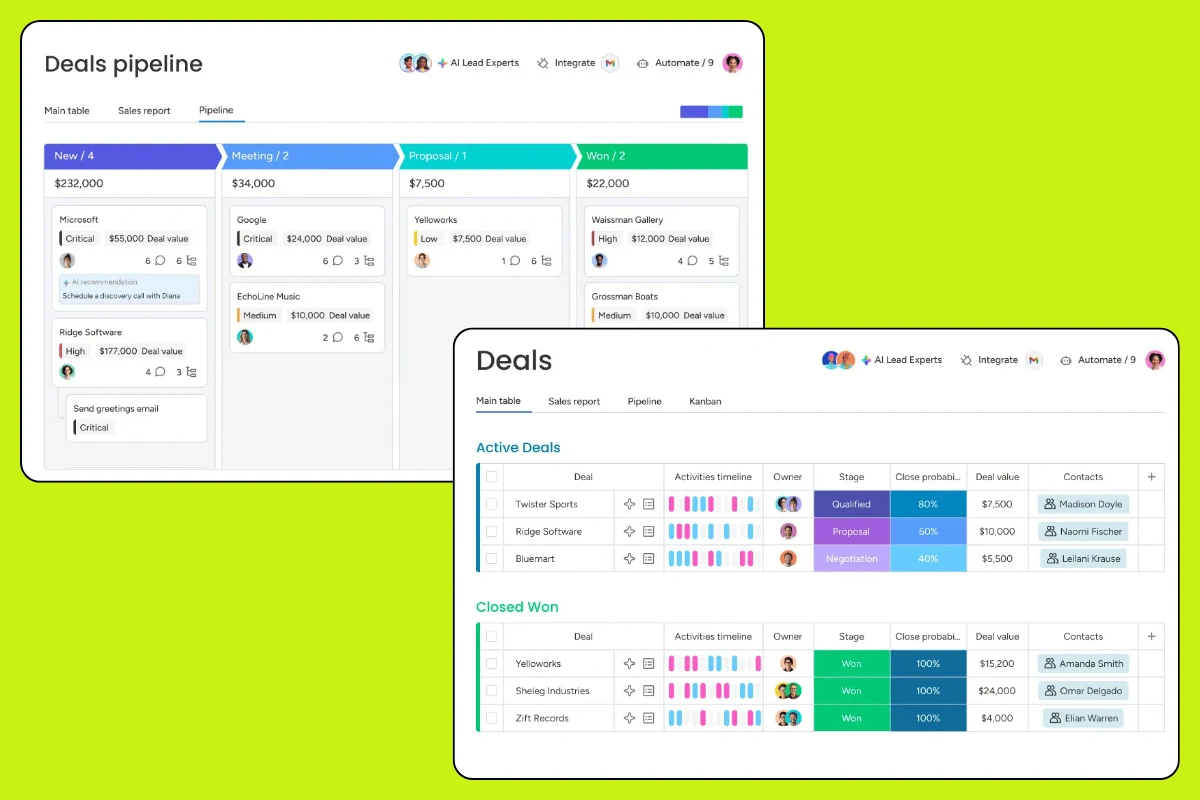
- Pipeline and deal tracking – visual view of every active deal by stage, with predicted close dates and revenue
- Account and contact management – company records with full contact hierarchies attached
- Activity logging – automatic or manual logging of calls, emails, and meetings
- Task and follow-up automation – reminders and sequences so no deal goes cold by accident
- Reporting – sales velocity, win rates, pipeline coverage, rep performance
- Integrations – email (Gmail/Outlook), calendar, LinkedIn, and your other sales tools
Most modern B2B CRMs also include some form of email sequencing, lead scoring, and workflow automation. Whether you need all of that depends on your team size and deal volume.
What is a B2C CRM?
A B2C CRM is a customer relationship management platform designed for businesses selling directly to individual consumers. The defining characteristic is volume. Where a B2B team might manage 200 active deals at a time, a B2C business might have 200,000 customer records in its database – with purchases happening daily and relationships measured in months rather than multi-year contracts.
B2C CRM manages the full customer lifecycle: first contact, first purchase, repeat purchases, lapsed customers, and win-back campaigns. The sales cycle is short – often the first interaction either converts or doesn’t – so the CRM’s value is less about managing individual deals and more about automating follow-ups, segmenting audiences, and keeping customers engaged over time.
Why B2C CRM is built for volume, not complexity
In B2B, every deal is a name you know. In B2C, most of your customers are data points – purchase history, email opens, abandoned carts, lifetime value. The CRM has to make sense of that at scale without requiring a human to touch every record.
That’s why B2C CRMs put marketing automation at the center. Triggered emails, behavioral segmentation, loyalty workflows, and abandoned cart sequences – these are things a B2C business runs automatically on thousands of customers simultaneously. A B2B CRM typically isn’t built for this, and trying to force it to work that way is a frustrating workaround at best.
B2C CRM also handles multichannel contact management differently. Your customers expect to reach you on WhatsApp, via a chatbot, through email, and on social. The CRM needs to unify that into a single customer view. Most B2B CRMs don’t prioritize this because their buyers are reaching out through email and scheduled calls – not Instagram DMs.
Key features of a B2C CRM
What you actually need from a B2C CRM:
- Large-scale contact management – handles hundreds of thousands of records without performance issues
- Marketing automation – triggered sequences, behavioral workflows, lifecycle campaigns
- Customer segmentation – slice your database by purchase behavior, location, lifetime value, activity
- Email and SMS marketing – built-in channels or tight integrations with platforms like Klaviyo or Mailchimp
- Multichannel support – unified inbox, social, live chat, and/or WhatsApp
- Reporting on CLV and retention – customer lifetime value, churn rate, cohort analysis
B2B vs B2C CRM: 5 key differences
Most of the confusion between B2B and B2C CRM comes down to five dimensions. Here’s where they actually diverge.
1. Sales cycle length and complexity
B2B sales cycles run long. The average B2B deal takes anywhere from a few weeks (SMB) to six months or more (enterprise). That means the CRM needs to hold months of context per deal – every email, every call, every pricing conversation – so it doesn’t get lost between follow-ups.
B2C is the opposite. A consumer either buys or doesn’t, usually within one session or a few days of first contact. The CRM’s job isn’t to nurture a single customer through a long process – it’s to build systems that move large numbers of customers through short, mostly automated journeys simultaneously.
If your average deal takes more than two weeks to close and involves a conversation, you’re running a B2B sales motion. If most of your customers convert without ever speaking to a human, you’re in B2C territory.
2. Customer data and relationship depth
B2B CRM is account-centric. The most important record is the company, not the individual. When someone leaves a company, the relationship doesn’t disappear – you still have a relationship with the account, and you need to rebuild contact with the new buyer.
B2C CRM is person-centric. You know your customers as individuals: what they bought, when they last purchased, what they almost bought, how many times they’ve opened your emails. The value of this data comes from aggregating it across thousands of customers to find patterns – not from deeply knowing any individual one.
This also affects how data is structured. B2B CRMs use a three-tier model: Account → Contact → Deal. B2C CRMs typically use a flat model: Contact → Purchase History → Campaign History.
3. Automation and personalization at scale
In B2B, “personalization” usually means a sales rep genuinely knowing the prospect’s situation – their company’s pain points, their budget cycle, who else is involved in the decision. That’s relationship-based. Automation supports the rep but doesn’t replace the human touch.
In B2C, personalization is algorithmic. You’re not hand-writing emails to 50,000 customers. You’re segmenting them by behavior and sending relevant triggered messages automatically. The best B2C CRMs are essentially marketing automation platforms with CRM databases attached.
This is why using a B2B CRM like Pipedrive for a B2C business is such a bad fit. Pipedrive is brilliant for pipeline management. It’s not designed to run post-purchase email sequences to 30,000 customers, segment them by purchase frequency, and re-engage the lapsed ones automatically. That’s a different tool entirely.
4. Decision-making process
B2B buying involves multiple stakeholders. There’s typically a champion (the person pushing for the tool), an economic buyer (controls the budget), a technical evaluator, and sometimes legal or security reviewers. The CRM needs to track all of them, log their individual concerns, and help the sales rep navigate consensus-building across weeks of conversations.
B2C buyers are usually a single person making a solo decision. They might be influenced by reviews, ads, or a recommendation – but the decision happens in one person’s head, often quickly. The CRM’s job is to remove friction from that decision and follow up appropriately if they abandon the journey partway.
5. Analytics and ROI measurement
B2B sales analytics focus on pipeline health: deal volume, average deal size, win rate, sales velocity (how fast deals move through stages), and forecast accuracy. The question is “will we hit our number this quarter, and where are the bottlenecks?”
B2C analytics focus on customer lifecycle metrics: customer acquisition cost (CAC), customer lifetime value (CLV), purchase frequency, churn rate, and cohort retention. The question is “are we acquiring customers profitably, and are they staying long enough to matter?”
These are fundamentally different measurement frameworks. A B2B CRM will give you excellent pipeline reports and be nearly useless for cohort retention analysis. A B2C CRM will show you exactly how many customers you acquired in March and what percentage returned in April – and won’t help you forecast your quarterly deal pipeline at all.
B2B vs B2C CRM: side-by-side comparison
| Dimension | B2B CRM | B2C CRM |
|---|---|---|
| Primary customer unit | Account (company) | Contact (individual) |
| Typical customer volume | Hundreds to low thousands | Thousands to millions |
| Sales cycle | Weeks to months | Hours to days |
| Deal complexity | High – multiple stakeholders | Low – individual decision |
| Primary CRM job | Manage pipeline and relationships | Automate marketing and retention |
| Automation focus | Task reminders, follow-up sequences | Email/SMS campaigns, behavioral triggers |
| Key reports | Pipeline, win rate, sales velocity | CLV, churn, cohort retention, CAC |
| Best-fit tools | Pipedrive, Salesforce, HubSpot Sales | ActiveCampaign, Klaviyo, HubSpot Marketing |
| Pricing sensitivity | Low – deal value justifies cost | High – margin per customer is often thin |
| Team structure | Sales reps manage individual deals | Marketing team runs campaigns to segments |
One thing the table above can’t capture: how often businesses fall between these categories. Which brings us to the model nobody talks about enough.
What about B2B2C? The hybrid model explained
B2B2C (business-to-business-to-consumer) is when a company sells to businesses that then sell to consumers. A payment processor, a SaaS platform with an agency partner channel, or a wholesale supplier that also manages direct-to-consumer retail – these all have B2B2C characteristics.
The CRM challenge here is real. You have business accounts to manage (the B2B side), and you may also have direct consumer relationships or end-user data to track (the B2C side). Forcing everything into a single B2B or B2C CRM creates awkward workarounds.
A few common approaches:
Separate CRMs for each motion. Use a B2B CRM for your partner and reseller relationships, and a B2C CRM for your direct consumer channels. This means two systems to maintain, but it keeps each one clean and fit-for-purpose.
HubSpot’s combined platform. HubSpot’s Sales Hub covers B2B pipeline management, while Marketing Hub covers B2C-style automation. For a B2B2C business that doesn’t want to manage two completely separate platforms, HubSpot is one of the few tools that can genuinely do both – though the cost adds up at higher tiers.
A flexible CRM with custom pipelines. Some teams use a mid-tier CRM like monday.com CRM and build out separate pipelines and automations for each motion. The tradeoff is more configuration work upfront and less out-of-the-box sophistication for either use case.
Our honest take: if your B2B and B2C motions are both significant, don’t try to solve it with one tool. The compromises you make on each side end up costing more than managing two focused platforms.
How to choose: B2B or B2C CRM?
The first thing to do is ignore your business category label. Ask yourself what your sales process actually looks like.
Questions to ask before picking a CRM
Work through these before you look at a single pricing page:
How long does a typical sale take? If the average time from first contact to signed deal is under a week, you’re running a B2C-style motion. If it regularly runs two weeks or more, lean toward B2B.
How many conversations happen before a customer buys? One to two touchpoints = B2C. Four or more meaningful conversations = B2B.
Is each customer relationship managed by a named person on your team? If yes, you need a B2B CRM. If customers are largely self-serve or managed in aggregate, you need B2C.
What do you most need to report on? If you want pipeline visibility and forecast accuracy, that’s B2B analytics. If you want retention curves and CLV trends, that’s B2C.
How many active relationships can your team realistically track? A sales rep can manage 100–200 active B2B deals well. If you’re handling more than 500 customer records per person, you need automation, not manual tracking.
What happens after the first sale? If the relationship deepens and the account grows over time, that’s a B2B pattern. If the goal is repeat purchases through marketing rather than ongoing relationship management, that’s B2C.
When your sales motion matters more than your business category
Here’s the insight most B2B vs B2C guides skip: the label on your customer doesn’t determine which CRM you need. Your sales motion does.
A professional services agency selling $15,000 consulting projects to individual entrepreneurs is technically B2C – but it needs a B2B CRM. Those deals are complex, they take months to close, and each client relationship is managed personally by a consultant.
A self-serve SaaS tool selling $49/month plans to small businesses is technically B2B – but it needs a B2C CRM. Customers sign up online, there’s no sales rep involved, and the growth model depends on automated onboarding sequences, product-led expansion, and re-engagement emails when users go quiet.
The frame that actually helps: think about whether your revenue comes primarily from new relationship formation (B2B CRM) or volume and retention (B2C CRM). If you spend most of your sales energy starting and closing individual deals, you need B2B. If you spend most of your energy getting people to buy again, sign up automatically, or refer others, you need B2C.
Best CRM software for B2B businesses
We’ve reviewed and tested the tools below. These are our top picks for B2B sales teams.
Pipedrive – best for sales-focused teams
Pipedrive is built by salespeople for salespeople, and it shows. The pipeline view is one of the cleanest in the market: drag-and-drop deals between stages, see exactly where everything stands, and configure it to match your actual sales process without a week of setup.
Where Pipedrive wins: activity-based selling. It nags you (helpfully) about the next action on every deal. If you’re a founder managing your own sales process or a small team without a dedicated RevOps function, Pipedrive keeps deals from going cold without requiring disciplined CRM hygiene.
Where it falls short: marketing automation is an add-on, not a core feature. For email sequencing beyond basic templates, you’ll pay more or integrate with a separate tool.
Pricing: from €14/user/month (Essential). Worth the step up to Advanced (€34/user/month) for email automation.
Read our full Pipedrive CRM review for our scoring breakdown.
HubSpot – best for B2B teams that also run marketing
HubSpot’s free CRM is genuinely useful, not just a lead-generation gimmick. The base product handles contact and deal management well, integrates with Gmail and Outlook out of the box, and gives you a decent pipeline view at no cost.
The real HubSpot advantage is the platform breadth. If your B2B team also runs inbound marketing – content, SEO, email campaigns – HubSpot lets you manage all of it in one place and pass leads directly into the sales pipeline without data moving between systems.
The caution: HubSpot’s pricing scales fast. The free tier is limited, and the paid tiers (starting at €15/user/month for Sales Hub Starter) add up quickly once you need automation, sequences, and reporting. Enterprise pricing is genuinely steep.
Best for: B2B teams of 5–50 people who want CRM and marketing in one tool and can justify the cost.
Read our HubSpot review for the full breakdown.
monday.com CRM – best for flexible teams
monday.com CRM is genuinely flexible in a way most CRMs aren’t. You can build your pipeline exactly the way you work rather than fitting your process into the tool’s pre-built structure. For teams with non-standard sales processes – agencies, project-based businesses, complex services – that flexibility is worth a lot.
The tradeoff is that it takes more configuration to get right. Out of the box, it’s less immediately useful as a CRM than Pipedrive or HubSpot. You’ll spend time setting up your pipelines, fields, and automations before it feels natural.
Best for: Teams that find standard CRM pipelines too rigid and are willing to invest setup time.
Read our monday.com CRM review.
Salesforce – best for enterprise B2B
If your team has more than 50 sales reps, complex territory management, or enterprise-scale reporting requirements, Salesforce is in a category of its own. It can do almost anything – at the cost of complexity, implementation time, and a pricing structure that rarely surprises anyone in a good way.
For SMBs: Salesforce is almost certainly overkill. The implementation cost alone (consultants, training, admin time) often exceeds what smaller teams should spend on a CRM. If you’re seriously considering it at under 30 people, check our honest Salesforce review first.
Best for: Enterprise B2B teams with dedicated CRM admin resources and genuine requirements that smaller tools can’t meet.
See our full best sales CRM ranking for a side-by-side comparison of all the options.
Best CRM software for B2C businesses
B2C CRM recommendations depend more heavily on your existing marketing stack. Here’s what we’d use.
ActiveCampaign – best all-around B2C CRM
ActiveCampaign sits in a sweet spot between email marketing platform and CRM. The automation builder is one of the most powerful in the market – you can build complex behavioral workflows that trigger based on site visits, email opens, purchase events, or custom data – without needing developer support.
The contact management side is solid but not a sales pipeline tool. If you’re running a B2C business where the “sales process” is mostly automated, ActiveCampaign is very hard to beat at its price point.
Pricing: from $15/month (500 contacts). Scales with list size, which is worth watching if your database grows fast.
Read our full ActiveCampaign review.
HubSpot Marketing Hub – best for inbound B2C
If you’re running content marketing, SEO, and inbound as your primary B2C acquisition channels, HubSpot’s Marketing Hub is worth the cost. The combination of landing pages, forms, email, and contact management in one platform – with clean analytics connecting acquisition to revenue – is genuinely useful.
The caution applies here too: pricing scales fast, and the free-to-paid jump is significant. Make sure you’re getting real value from the automation features before committing to the paid tiers.
Best for: B2C businesses with inbound marketing as a major channel and 5,000+ contacts in the database.
Freshworks CRM – best for B2C on a budget
Freshworks (previously Freshsales) offers a solid B2C-capable CRM at a lower price point than most competitors. The contact management is clean, the automation is capable enough for most small-team use cases, and the built-in phone and email tools reduce the need for separate integrations.
It doesn’t have the depth of ActiveCampaign for complex behavioral automation, but for a small B2C team that needs basic CRM plus email without paying enterprise prices, it’s a strong option.
Pricing: from $9/user/month (Growth). Free plan available with basic features.
Read our Freshworks CRM review.
For a full comparison of B2C-friendly tools, see our best CRM for marketing ranking.
FAQ: B2B vs B2C CRM
What is the difference between B2B CRM and B2C CRM?
B2B CRM is built for long sales cycles with multiple decision-makers – it tracks accounts, deals, and company-to-company relationships, and helps sales reps manage complex conversations over weeks or months. B2C CRM handles large volumes of individual customer interactions, prioritizing speed, marketing automation, and personalization at scale. The core difference is relationship depth vs relationship volume.
What is a B2B CRM?
A B2B CRM is a platform for managing sales to other businesses. It organizes contacts within company accounts, tracks deals through a pipeline, logs all customer interactions, and helps sales teams move opportunities from first contact to close – usually over a sales cycle that runs weeks to months and involves multiple stakeholders.
What is a B2C CRM?
A B2C CRM manages relationships with individual consumers at scale. It handles large contact databases, automates email and SMS marketing sequences, segments customers by behavior and purchase history, and tracks lifecycle metrics like customer lifetime value and churn rate. The goal is to acquire customers profitably and keep them engaged over time through largely automated processes.
Is Salesforce a B2B CRM?
Yes – Salesforce Sales Cloud is primarily a B2B CRM. It is built around account management, multi-stakeholder deals, complex pipelines, and enterprise-scale reporting. Salesforce also sells B2C-oriented products (Marketing Cloud, Commerce Cloud, Consumer Goods Cloud), but when people say “Salesforce CRM” they typically mean Sales Cloud, which is a B2B tool.
What are the 4 types of CRM?
The four CRM types are: operational (manages day-to-day sales, marketing, and service workflows), analytical (surfaces insights from customer data to inform strategy), collaborative (shares customer information across sales, marketing, and support teams), and strategic (focuses on long-term customer relationship development). Most modern CRM platforms – Salesforce, HubSpot, Pipedrive – incorporate all four to varying degrees in a single product.
What are the 4 types of B2B marketing?
The four main types of B2B marketing are: content marketing (blogs, guides, and whitepapers that attract inbound leads), account-based marketing or ABM (personalized outreach to specific high-value target companies), email marketing (nurturing sequences and campaigns to existing contacts and prospects), and event marketing (trade shows, webinars, and industry conferences). A B2B CRM ties all four together – tracking which contacts engage with which campaigns and connecting that activity directly to pipeline movement and closed deals.
Not sure which CRM is right for your business? Browse our top CRM tools ranked for an independent comparison across categories, team sizes, and budgets.