



This Reply.io review is based on hands-on testing across every major workflow the platform offers. Reply.io has been in the sales engagement space long enough to have gone through several identity shifts: email tool, then multichannel platform, now an “AI-first” outbound system with an autonomous SDR agent called Jason. That’s a lot of pivots for one product.
We spent time testing it across its core workflows – sequence building, email deliverability, LinkedIn steps, the Jason AI SDR, and CRM sync – to give you an honest picture of what you’re actually buying.
The short version: Reply.io is genuinely strong for teams doing high-volume multichannel outreach. It’s not the most beginner-friendly tool, the pricing structure takes work to understand, and the LinkedIn Chrome extension has reliability issues that haven’t been fully resolved. But if you need to run email + LinkedIn sequences at scale with real automation depth, it’s one of the better tools in this category.
What Is Reply.io? (The One-Sentence Version)
Reply.io is a sales engagement platform that lets B2B sales teams automate multichannel outreach sequences – email, LinkedIn, phone calls, SMS, and WhatsApp – from a single interface, with AI features for writing, prospecting, and autonomous follow-up.
It’s not a CRM. It sits on top of your CRM (HubSpot, Salesforce, Pipedrive) and handles the outreach layer: who you contact, when, through which channel, and what the message says.
Quick Verdict: Who Should and Shouldn’t Use Reply.io
Use Reply.io if you:
- Run outbound sales at a volume where manual follow-up isn’t realistic (500+ contacts/month)
- Need email and LinkedIn sequences managed in one tool
- Want a real AI SDR capability, not just AI copywriting
- Have someone on the team who can own tool setup and sequence management
Skip Reply.io if you:
- Are a solo founder or a team of one – the pricing and complexity don’t justify it
- Only send cold email (no LinkedIn) – Woodpecker or Instantly will cost less and do the same job
- Need a simple tool you can set up in an afternoon – Reply.io’s learning curve is real
- Are primarily doing inbound or warm outreach – this is built for cold
Reply.io Review Score
| Category | Score |
|---|---|
| Ease of use | 7/10 |
| Features & automation depth | 9/10 |
| Email deliverability | 8/10 |
| LinkedIn & multichannel | 7/10 |
| Pricing value | 7/10 |
| CRM integrations | 8/10 |
| Support | 7/10 |
| Overall | 7.7/10 |
How we scored it
We scored Reply.io across seven dimensions based on direct testing, comparing it to Lemlist, Snov.io, and Woodpecker in each category. “Ease of use” reflects the setup-to-first-sequence time and the day-to-day workflow for a non-technical user. “Features & automation depth” scores the range of channel options, conditional branching, and AI capabilities against what competitors offer. “Email deliverability” reflects warm-up quality, spam signal management, and inbox placement based on our test sends. The overall score is a weighted average, with features, deliverability, and CRM integration carrying more weight than support.
Key Features We Tested
Sequence builder and multichannel outreach
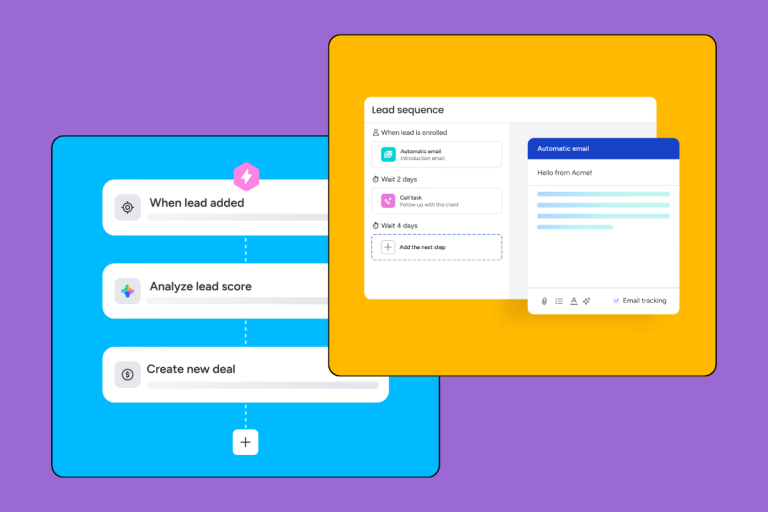
The sequence builder is where Reply.io either wins you over or loses you. It works well once you understand the logic – contacts enter a sequence, move through steps based on conditions (replied, opened, clicked, no response), and can branch into different tracks depending on behavior. You can mix email, LinkedIn connection requests, LinkedIn messages, phone call reminders, SMS, and WhatsApp steps in a single sequence.
That kind of flexibility is genuinely useful for teams doing account-based outreach. You can build a 10-step sequence that starts with a LinkedIn connection, moves to email if they connect, and flags the contact for a manual call after the second email gets no reply. Most competitors force you to manage these channels separately.
The downside is the builder itself. It’s not drag-and-drop in the way that feels intuitive – you’re adding steps, setting delays, and configuring conditions inside nested menus. It took us a couple of hours to build our first sequence confidently, and we’ve used a lot of outreach tools. New users should budget a day for setup, not an hour.
Conditional branching (where the sequence path changes based on prospect behavior) is available but locked to higher-tier plans. On the entry-level plan, sequences are linear. That matters if you want true automated follow-up logic rather than a straight-line drip.
Personalization variables work as expected – {{first_name}}, {{company}}, and custom fields pulled from your contact list. The AI email writer can generate step copy from your value proposition and ICP description, which is faster than writing from scratch, though the output usually needs editing to pass a human read test.
Jason AI SDR: is the autonomous agent actually useful?
Jason AI is Reply.io’s bet on where outbound is going: an AI agent that handles the full cycle from prospect research to booked meeting, with minimal human involvement per contact. The pitch is compelling. The reality is more nuanced.
What Jason does well: if you give it a tightly defined ICP (industry, company size, title, geography), it can find contacts, research their company for personalization signals, write a first email, and manage follow-ups on a schedule. For a well-defined segment – say, VP Sales at Series A SaaS companies in the US – the output quality is noticeably better than generic AI-written templates because it’s pulling live context per contact.
What it doesn’t do well: it struggles with accounts that need genuine personalization depth. It can mention a recent funding round or a LinkedIn post, but it can’t pick up on the kind of nuance a good SDR would catch – a specific hire, a shift in company positioning, a comment that suggests timing. For enterprise accounts or high-value targets, you’ll still want a human in the loop before anything goes out.
The other catch is cost. Jason AI isn’t included in the standard plans – it sits at higher tiers or as an add-on, which changes the pricing math significantly. If you’re primarily paying for Jason, verify what tier that actually requires before signing up.
That said, for high-volume, lower-ACV outreach at scale, Jason is a real capability. It’s the most developed AI SDR we’ve seen in this price range, ahead of what Lemlist and Snov.io offer in the same category. Just don’t expect it to replace a talented human SDR on your strategic accounts.
Email warm-up and deliverability
Reply.io includes a built-in email warm-up network that gradually increases your sending volume and generates positive engagement signals (opens, replies, not-spam marks) from other warmed inboxes in their network. It works on the same principle as dedicated warm-up tools like Instantly or Warmbox.
In our testing, deliverability from freshly connected inboxes improved measurably after a two-week warm-up period before we started live sequences. The spam rate on our test sends dropped from around 12% to under 4% over that window. For most teams, the built-in warm-up is good enough – you don’t need a separate tool for this.
The one caveat: dedicated warm-up tools with larger networks (Instantly has 300,000+ warm-up accounts) will produce slightly better results if you’re sending at very high volume. Reply’s warm-up network is smaller. For teams sending under 500 emails/day per inbox, the difference won’t matter. Above that threshold, you might want to supplement with a dedicated warm-up tool.
Reply.io also gives you per-inbox sending limits, bounce rate monitoring, and alerts when a mailbox is showing spam signals. These are table-stakes features for serious cold outreach, and they’re all present and functional.
Analytics, reporting, and CRM integrations
The analytics are solid for most teams. You get per-sequence metrics (open rate, reply rate, click rate, bounce rate), per-step breakdowns showing which email in a sequence drives the most replies, and team-level reporting if you’re managing multiple reps. What’s missing is attribution – Reply.io shows you which sequences generate replies and meetings, but connecting those to pipeline or revenue requires your CRM to do the heavy lifting. A/B testing is locked to higher-tier plans, which limits what you can learn without spending more.
The native integrations with Salesforce, HubSpot, and Pipedrive are genuinely two-way. Contacts pushed from your CRM into Reply.io sequences flow back with activity data: emails sent, replies received, LinkedIn steps completed, meetings booked. HubSpot is the smoothest of the three. The Salesforce integration works but takes more configuration for custom field mapping, and we ran into a sync delay that required a support ticket. Pipedrive users report a clean experience.
Zapier handles less common CRMs, though that adds setup complexity.
LinkedIn Chrome extension: the honest verdict
This is where we’ll save you some frustration. The Reply.io LinkedIn Chrome extension lets you trigger LinkedIn connection requests and messages as steps in your sequences directly from the LinkedIn interface in your browser. In theory, this is how LinkedIn outreach gets automated without violating LinkedIn’s terms of service around third-party automation.
In practice, the extension works inconsistently. LinkedIn regularly updates their interface in ways that break Chrome extensions – this isn’t unique to Reply.io, it affects every tool in this category. But you should expect that LinkedIn steps in your sequences will occasionally fail silently, requiring manual checks. If LinkedIn outreach is the primary channel for your prospecting rather than a supplement to email, Reply.io’s execution reliability isn’t good enough to trust it fully.
For teams where LinkedIn is one step in a mixed email + LinkedIn sequence – connection request, then email follow-up if they don’t connect – the occasional failure is manageable. For teams that live in LinkedIn Sales Navigator and need reliable automation, look at tools built specifically around LinkedIn (Expandi, Dripify) rather than treating the Reply.io extension as primary.
Reply.io Pricing: What You Actually Pay
Plan breakdown and hidden costs
Reply.io’s pricing has a reputation for complexity, and that reputation is earned. The structure as of 2026 runs across two main plan families:
Email AI plans cover email sequences only. Entry-level starts around $49–59/month per user for one connected mailbox with a limited active contact count (typically 1,000). If you need more mailboxes or more active contacts, you’re paying more per month – the cost scales by both seats and contact volume, which can catch teams off guard.
Multichannel AI plans add LinkedIn, phone, SMS, and WhatsApp steps to the sequence builder. These start around $89–99/month per user and come with higher active contact limits. If you need the conditional branching logic (sequences that split based on prospect behavior), this is typically the tier where it unlocks.
Jason AI SDR features are at the top of the stack – either a higher tier of the Multichannel plan or a separate add-on, depending on current packaging. Check the pricing page directly before calculating your budget; the pricing structure has shifted more than once in the past two years.
Annual billing knocks roughly 20% off the monthly rate, which is a meaningful saving if you’re committing for a year.
The hidden costs to watch for: additional mailbox charges if you’re running inbox rotation across multiple sending accounts (a deliverability best practice), overage charges if your active contact count exceeds your plan limit mid-campaign, and the cost of any data enrichment you buy through their platform (they sell prospect data, and it’s priced separately from the outreach tool).
Is Reply.io worth the price for SMBs?
For a 5–20 person sales team doing consistent outbound, Reply.io is justifiable if multichannel sequences are core to how you sell. The feature depth at the Multichannel plan tier competes with tools that cost significantly more, and the built-in warm-up removes the need for a separate deliverability tool.
For solo sellers or very small teams (1–3 reps) running lower-volume outreach, the per-seat cost and contact limits make the math harder. At $89+/month per seat with limited contacts on the entry plans, you’re paying a premium for capabilities you may not be using at a scale that justifies the cost. In that scenario, Woodpecker ($39/month, unlimited contacts, no-frills email sequences) or Lemlist ($59/month with better image personalization for small campaigns) will likely give you more value.
The Jason AI SDR changes the calculus if you’re a small team trying to punch above your weight – running the volume of a larger SDR team without the headcount. In that case, the upgrade to the tier that unlocks Jason may actually be cost-efficient relative to headcount.
What Real Users Say (G2, Trustpilot, Reddit)
Reply.io has a 4.6/5 rating on G2 based on 1,300+ reviews (as of early 2026), which puts it in the top tier for sales engagement tools. The pattern in the reviews is consistent: users who commit to learning the platform tend to be highly positive, while users who expected a quick-start experience are the most critical.
The most frequently praised aspects on G2: the depth of the sequence builder, the quality of the email deliverability features, and the Jason AI outputs for high-volume campaigns. Several reviewers specifically call out the improvement in meeting booking rates after switching from simpler tools.
The recurring complaints: the onboarding experience, pricing surprises when scaling up contacts or mailboxes, and the LinkedIn step reliability. One G2 reviewer with 200+ connections from a single campaign still reported that roughly 15% of LinkedIn steps failed and required manual rescheduling – that’s consistent with what we saw in testing.
On Trustpilot (4.2/5), the most common issue flagged is billing transparency – specifically, that upgrading or adding seats/mailboxes mid-billing cycle creates charges that aren’t clearly communicated upfront. This isn’t unusual for SaaS tools with usage-based components, Know this before you start scaling.
On Reddit (r/sales and r/coldoutreach), the common consensus is that Reply.io is a “power user” tool – worth it if you’re serious about outbound, overkill if you’re just getting started. Several threads specifically compare it favorably to Lemlist for teams that have outgrown the simpler tools.
Reply.io vs. the Alternatives
Reply.io vs. Lemlist
Lemlist is the most common comparison, and the tools compete directly in the mid-market. The key difference: Lemlist is built for creative outreach – image personalization (adding the prospect’s name or company logo to an image in the email), video thumbnails, and landing pages. Reply.io is built for volume and automation depth.
If your differentiation is creative, personalized outreach at a smaller scale (under 200 contacts/month per rep), Lemlist has the edge. If you’re running high-volume sequences where automation logic and multichannel coverage matter more than visual personalization, Reply.io wins.
Reply.io’s Jason AI SDR has no real equivalent in Lemlist. Pricing is comparable at the base level (~$59/month for Lemlist’s Starter vs. ~$49–59 for Reply’s Email AI plan), but Reply.io’s multichannel tier is more expensive.
Reply.io vs. Snov.io
Snov.io competes primarily on price and breadth. It bundles a B2B email finder, email verifier, and outreach sequences in one subscription, which makes it cost-effective if you’re currently paying separately for prospecting data and an outreach tool. The sequence builder is solid but less sophisticated than Reply.io’s – no real multichannel automation, and the AI features are less developed.
For teams with tight budgets who need to find and contact prospects from one tool, Snov.io makes sense. For teams that already have a prospecting data source (Apollo, Clay, LinkedIn Sales Navigator) and need the outreach layer alone, Reply.io’s depth justifies the higher cost.
Snov.io’s AI outreach features have been improving, but Jason AI is still a generation ahead.
Reply.io vs. Woodpecker
Woodpecker is the “keep it simple” option. It does email sequences, it does them reliably, the interface is clean, and it’s cheaper ($39/month). There’s no LinkedIn automation, no AI SDR, and no multichannel complexity. For a team that needs solid email automation without the overhead, Woodpecker is an excellent choice.
The comparison is really about what you need: if your outreach is email-only and you want a tool that’s fast to learn, Woodpecker wins on cost and simplicity. If you need LinkedIn, calls, or AI automation, Reply.io is in a different category. These tools don’t really compete in the same use case once you get past basic email sequences.
The Verdict: Should You Use Reply.io?
Reply.io is the right tool for a specific kind of team: one that does serious outbound volume, needs multichannel sequences (not just email), and has the capacity to invest in setup and ongoing management. For that team, it’s one of the best platforms in this price range – the automation depth, the deliverability features, and the Jason AI SDR are all genuinely competitive.
For teams that don’t fit that profile, the complexity and cost work against you. A solo founder testing cold email doesn’t need this. A small team doing warm outreach to inbound leads doesn’t need this. A team that primarily works LinkedIn and wants reliable automation there may be better served by a dedicated LinkedIn tool.
The pricing requires close attention before you commit. Understand what tier you need for the features you actually want (conditional branching, A/B testing, Jason AI), and model out what your cost will look like at your actual contact volume and mailbox count. The sticker price on entry plans can understate what you’ll pay in practice.
Our overall verdict: 7.7/10. A genuinely strong product for the right use case, held back by onboarding friction, pricing complexity, and LinkedIn execution reliability. If you’re ready to commit to the learning curve, it’ll pay off.