
Before you pick a CRM, you need to know which type you’re actually looking for. Most buyers skip this step. They pick based on brand recognition, end up with a tool that’s either overkill or too limited, and spend three months wondering why nobody’s using it.
There are four core types of CRM software: operational, analytical, collaborative, and strategic. Understanding which one fits your situation takes about five minutes. It’ll save you from a six-month implementation headache.
Quick orientation: most modern CRM platforms combine more than one type. The type classification isn’t about finding a box to put your CRM in – it’s about knowing which capabilities to prioritize when you’re evaluating your options.
What are the main types of CRM software?
CRM software falls into four main categories: operational (automates sales, marketing, and service workflows), analytical (turns customer data into insights), collaborative (shares customer information across teams), and strategic (focuses on long-term relationship building). Most small businesses need an operational CRM first. The other types become relevant as you scale.
That paragraph is the direct answer. Everything below is the supporting argument.
1. Operational CRM
Operational CRM is the most common type – and the one most small businesses actually need. It handles the day-to-day mechanics of customer relationships: tracking contacts, managing your pipeline, automating follow-ups, logging calls.
If your sales process currently lives in a spreadsheet or your team’s heads, this is where you start.
What operational CRM does
There are three core functions. First, sales force automation: your pipeline, deal stages, contact records, and follow-up reminders, all in one place. You know exactly where every deal sits and what happens next. Pipedrive built its entire product around this idea, and it works.
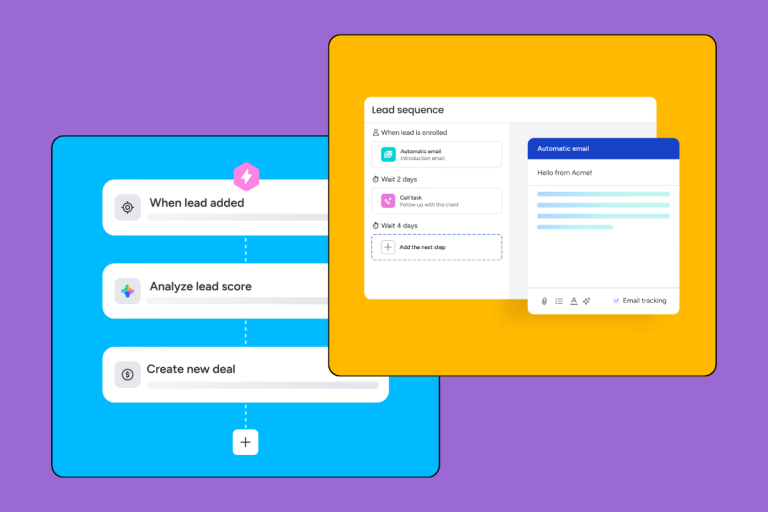
Second, marketing automation: email sequences, lead scoring, form captures. You stop manually following up on every inquiry and let the system handle the routine volume.
Third, customer service automation: ticketing, case management, routing. This matters more for support-heavy businesses than for pure sales teams – if you’re a 15-person B2B company with a focused sales motion, you’ll barely touch this.
The defining characteristic of operational CRM: it’s about doing things. Moving contacts through a pipeline, sending emails, logging interactions. It’s active, not passive. You won’t get deep analytical reports or cross-team visibility out of a purely operational CRM, but you will get a system your sales team will actually use.
Best for: who should use it
Operational CRM is the right choice if you’re a 5–50 person company with a sales team handling outbound calls or inbound leads. If deals are falling through the cracks because follow-ups aren’t happening. If your “process” is currently a spreadsheet. If you need to onboard new salespeople and have something concrete to hand them.
It’s also the right starting point if you’re genuinely unsure which CRM type you need. Solve the operational problem first. Analytics and collaboration can come later.
Operational CRM examples
- Pipedrive – the cleanest operational CRM for sales-focused teams. Pipeline view is its identity. Nothing fancy, nothing wasted.
- Monday CRM – operational CRM with a visual, project-management feel. Works well for teams that span multiple functions.
- Keap – operational CRM with strong marketing automation built in. Better fit for service businesses doing heavy email follow-up sequences.
- HubSpot CRM – starts as an operational CRM and scales into analytical and collaborative territory as you move up the tiers.
2. Analytical CRM
Operational CRM tells you that a deal closed. Analytical CRM tells you why it closed – and why three others didn’t.
This is the type that answers the hard questions: which lead sources produce customers with the best lifetime value? Which salespeople need coaching based on data rather than gut feel? Where in the pipeline do deals stall most often?
What analytical CRM does
Analytical CRM collects customer data from multiple touchpoints and turns it into something usable. Customer segmentation – grouping customers by behavior, value, or industry – lets you run targeted campaigns and identify your best-fit accounts. Behavioral analysis tracks what customers do across your sales process. Predictive analytics uses historical patterns to forecast revenue or flag at-risk accounts. The reporting dashboards make all of it visible without needing a data scientist on staff.
The AI features showing up in every major CRM right now? Mostly analytical. Salesforce’s Agentforce, Zoho’s Zia, HubSpot’s predictive lead scoring – all analytical CRM features wrapped in modern UI.
Best for: who should use it
Analytical CRM becomes meaningful when you have enough data to make analysis actionable. Roughly: 12+ months of deal history, 100+ customers, a team large enough that individual performance differences start mattering. A five-person startup with 20 clients doesn’t need analytical CRM yet. A 50-person SaaS company with thousands of accounts does.
If you’re making marketing and sales decisions based on instinct and want to shift to data, this is the type to prioritize. If you’re still building the process that generates the data, start with operational CRM instead.
Analytical CRM examples
- Salesforce – the gold standard for analytical CRM at scale. Reporting capabilities are genuinely impressive and the AI layer is the most mature on the market. Also genuinely expensive.
- Zoho CRM – solid analytical features at a fraction of Salesforce’s price. Zia (Zoho’s AI) handles predictive lead scoring and anomaly detection reasonably well.
- HubSpot (mid-tier and above) – strong on analytics when you’re using the full Marketing Hub alongside the CRM. The free tier is mostly operational.
3. Collaborative CRM
Here’s the problem collaborative CRM solves. Sales closes a deal and throws it over the wall to onboarding. Onboarding doesn’t know what was promised. Support gets a complaint and has no history of the account. Marketing runs a campaign to customers who are already in an active support dispute. Everyone’s working from a different version of the customer.
Collaborative CRM fixes that by making a single customer record useful across all the teams touching that customer.
What collaborative CRM does
Two things. Contact management across teams: a shared view of every customer interaction regardless of which team or channel it came from. Marketing’s email history, sales calls, support tickets – in one timeline, attached to one contact record. And channel management: tracking interactions across email, phone, chat, and social, and keeping them connected to the right contact. So when a customer calls support, the agent can see they opened three emails about a pricing issue before picking up the phone.
The operational CRM manages the pipeline. The collaborative CRM manages the relationship across the whole business.
Best for: who should use it
Collaborative CRM makes sense when you have distinct sales, marketing, and support teams working with the same customers. When customer relationships span years, involve multiple stakeholders, or require handoffs between departments. B2B companies with complex accounts are the clearest use case – losing a customer to a botched onboarding handoff after a six-month sales cycle is expensive enough to justify serious investment in collaboration.
Solo founders and pure outbound sales teams won’t feel this pain yet. It’s a scaling problem, not a starting problem.
If you’re building B2B and wondering how this connects to customer type, our B2B vs B2C CRM guide covers how the collaboration requirements differ.
4. Strategic CRM
Strategic CRM is the odd one out in this list. It’s less a software category and more a philosophy that some CRM platforms are built around.
Where operational CRM focuses on this week’s pipeline and analytical CRM focuses on last quarter’s data, strategic CRM focuses on the next five years of customer relationships. It’s about customer lifetime value, loyalty, and retention rather than individual transactions.
What strategic CRM does
The specific capabilities: customer lifetime value modeling to understand which customers are worth investing in long-term; loyalty and retention programs with automated check-ins and renewal tracking; long-term pipeline management for contacts who won’t buy for 12–24 months; and personalization at scale, using customer history to make every interaction feel relevant rather than generic.
In practice, most platforms don’t market themselves as “strategic CRMs.” These capabilities are usually layered on top of a solid operational base – you’ll find them in the upper tiers of Salesforce, HubSpot, and Zoho rather than as standalone products.
Best for: who should use it
Strategic CRM thinking matters when losing one customer costs you six figures, when customer relationships span years with ongoing renewals, or when you’re building a retention-focused sales culture rather than a transactional one. Enterprise B2B. Professional services. Anything with high-value, long-duration customer relationships.
For most SMBs: this is something to build toward, not start with.
Other CRM types worth knowing
The four categories above are the core taxonomy. These three come up often enough to understand.
Mobile CRM
Mobile CRM isn’t a separate category – it’s a deployment format. Any CRM with a strong mobile app qualifies. It matters for field sales teams who update records between client visits. Both Pipedrive and HubSpot have good mobile apps; if your team is primarily in the field, make app quality a real criterion in your evaluation rather than an afterthought.
AI-powered CRM
Every major CRM markets AI features. Most of them are autocomplete with a badge. The ones actually worth attention: Salesforce Agentforce (genuinely leading), HubSpot’s AI tools (improving fast), Zoho’s Zia (solid for the price point). “AI-powered CRM” is a feature tier, not a category. Ask specifically what the AI does before it factors into your decision.
Industry-specific (vertical) CRM
Vertical CRMs are built for one industry – real estate, healthcare, financial services, construction. They come pre-loaded with the workflows and compliance requirements of that industry. Worth considering if your industry has regulations or workflows that generic CRMs handle badly. The tradeoff is less flexibility and typically a smaller development team behind the product.
Which CRM type do popular tools fit?
Nobody seems to answer this directly. Here’s how we’d classify the tools we’ve reviewed and tested:
| CRM tool | Primary type | Notes |
|---|---|---|
| Pipedrive | Operational | Built for sales pipeline management. Minimal analytics, no marketing automation in the base plan. |
| HubSpot CRM | Operational + Analytical + Collaborative | All-in-one. Gets meaningfully analytical from the Professional tier upward. |
| Salesforce | All-in-one | Covers all four types. Enterprise-grade everything, including the pricing. |
| Monday CRM | Operational | Visual pipeline management. Project-management DNA you either love or find distracting. |
| Zoho CRM | Operational + Analytical | Good analytics at mid-market price. Zia AI is a genuine differentiator at the price point. |
| Zendesk Sell | Operational + Collaborative | Sales CRM designed to connect with Zendesk Support. Best if you’re already in the Zendesk ecosystem. |
| Capsule CRM | Operational | Lightweight. Good for small teams who want contact and pipeline management without the overhead. |
| Keap | Operational (marketing-heavy) | Strong marketing automation baked in. Better for service businesses than pure sales teams. |
How to choose the right CRM type for your business
Forget the taxonomy for a second. The practical question is: what problem are you trying to solve right now?
If your main problem is manual data entry and no process
You need an operational CRM. Specifically: a clear pipeline view, contact records, and follow-up reminders. Start with Pipedrive or Monday CRM. Get your data in, get your team using it consistently, then think about analytics.
The mistake we see constantly: companies buy Salesforce because they assume they need enterprise features, spend three months on implementation, and end up with a CRM nobody touches. Buy the operational tool that matches your current complexity, not your theoretical future scale. You can always migrate up. You can’t get back those three months.
If your main problem is not understanding your customers
You probably have an operational CRM already and need to use it better – or add analytical capabilities. Before buying anything new, check what your current CRM can actually do. HubSpot and Salesforce both have analytics built in. Zoho’s mid-tier plans include predictive features.
If you genuinely need deeper analysis than your CRM provides, check whether it integrates with a BI tool (Tableau, Looker, Power BI) before switching platforms entirely. Platform migrations are expensive.
If your main problem is team silos and handoffs
You need a collaborative CRM, or you need to configure your existing CRM to work collaboratively. And honestly, before buying new software, ask whether this is a process problem as much as a software problem. Do your teams have shared visibility in your current CRM? Is the problem that the software doesn’t share data, or that teams haven’t agreed on how to use it?
If it’s genuinely a software gap, HubSpot’s shared contact timeline and deal history is one of the cleaner implementations we’ve tested for cross-team visibility.
What are the 4 types of CRM?
The four types are operational, analytical, collaborative, and strategic. Operational CRM automates sales and marketing processes. Analytical CRM turns customer data into actionable insights. Collaborative CRM shares customer information across teams. Strategic CRM focuses on long-term customer relationship building and lifetime value.
What are the three types of CRM software?
Older frameworks described three types: operational, analytical, and collaborative. Strategic CRM was added later as a fourth category. You’ll still see the three-type taxonomy in academic or older resources – the underlying concepts are the same, just organized differently. The three-vs-four debate is less interesting than figuring out which type you actually need.
Which is the most commonly used CRM software?
Salesforce is the most widely deployed CRM globally by market share. For small businesses, HubSpot and Pipedrive are significantly more common – they’re easier to implement and priced for teams that aren’t running enterprise operations. The “most common” CRM at a 10-person company looks very different from the most common CRM at a Fortune 500.
Can one CRM be multiple types at once?
Yes, and most modern CRMs are. HubSpot, Salesforce, and Zoho all cover operational, analytical, and collaborative functions in one platform. The four-type taxonomy is useful for understanding what to prioritize – it’s not a hard product classification. Most buyers aren’t shopping for “a collaborative CRM.” They’re picking a platform and then using whichever capabilities solve their current problem.
Can I build a CRM in Excel?
Technically yes. In practice, it breaks down fast. A spreadsheet can track contacts and deals, but it has no automation, no shared access at scale, no pipeline view, and no notification system. Free CRMs like HubSpot CRM handle the basics without a subscription cost. If cost is the constraint, start there before building a spreadsheet system you’ll have to migrate off in six months anyway.
If you’re still deciding where to start, the short version is this: operational CRM first, always. Get your team using it, get 12 months of data in, and the next step – whether that’s analytics, better cross-team visibility, or neither – becomes obvious on its own. Our Pipedrive review and HubSpot review are the two starting points we point most SMBs toward.