
Customer service is the part of your business everyone says is important — and then underfunds. But here’s the thing: bad support doesn’t just frustrate customers, it kills retention. And retention is where the real money lives.
A CRM built into your customer service workflow changes that. It gives your support team the context, tools, and visibility they’d otherwise piece together from spreadsheets, inboxes, and gut feeling.
This guide covers what CRM software actually does for customer service teams, what benefits are real (and which are marketing fluff), and how to pick the right system for your situation.
Why Customer Service Makes or Breaks the Sale
Most companies think of customer service as a cost center — something to minimize. The data disagrees. Studies consistently show that customers weigh the quality of service more heavily than the product itself when deciding whether to buy again.
That’s not surprising if you think about it. Products are increasingly commoditized. Service is where differentiation actually happens.
Good customer service drives three things that matter commercially:
Retention. Customers who have a good support experience are more likely to renew, upsell, and stick around. Those who don’t — leave quietly and tell their network.
Word of mouth. Happy customers refer people. Unhappy ones write reviews. Both travel faster than any ad campaign you’ll run.
Feedback loops. Your support inbox is full of product intelligence. Customers tell you exactly what’s broken, confusing, or missing — if someone’s paying attention.
A CRM doesn’t create these outcomes on its own. But it gives your team the infrastructure to deliver them consistently.
What CRM Software Actually Does for Customer Service
Handle more tickets without adding headcount
The biggest practical benefit of CRM in customer service is throughput. Instead of your support team manually triaging emails from a shared inbox, a CRM centralizes every incoming request, assigns it automatically, and tracks its status from open to resolved.
Your team stops missing tickets. Response times drop. And you don’t need to hire your way out of the problem.
Automate the repetitive stuff
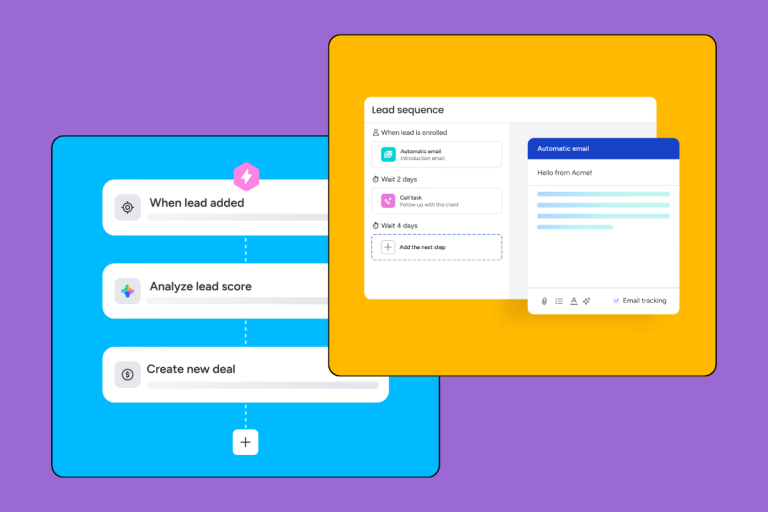
Not every support request needs a human. Common questions — order status, reset instructions, cancellation policies — can be handled with automated responses triggered by keywords or request type.
In practice, this means your agents spend their time on problems that actually require judgment, not on copying and pasting the same three answers forty times a day.
Give agents full customer context
When a customer contacts support, the worst possible experience is explaining their situation from scratch — again. A CRM fixes this by attaching every previous interaction, purchase, and conversation to the customer record.
Your agent opens the ticket and sees the full picture: what the customer bought, when they last reached out, what was promised in the previous call. That context makes support faster, more personal, and far less frustrating for everyone.
Measure what’s actually happening
CRM systems generate reporting that most support teams have never had access to: average resolution time, ticket volume by category, customer satisfaction scores, individual agent performance. Managers can spot where bottlenecks are forming before they become visible in churn data.
If you’re running a team of more than three people and your reporting is still “let me check my inbox,” that’s a gap worth closing.
The Real Business Impact
These aren’t abstract benefits. Here’s how they connect to outcomes your business cares about:
Stronger customer relationships. When your support team remembers who someone is and what they need, customers notice. Personalization at scale — even small touches like referencing a previous issue — builds the kind of trust that makes people stay.
Lower operational cost per ticket. Automation and streamlined workflows reduce the labor cost of handling each request. You’re not cutting corners; you’re removing friction that was slowing everyone down.
Better product decisions. The patterns in your support data — the questions that come up constantly, the features that confuse everyone — are a roadmap for your product team. A CRM that aggregates and reports on this data turns support into a feedback engine.
Higher LTV. Retention is compounding. A customer who stays an extra year because your support team was excellent is worth far more than any single acquisition.
How Customer Service Connects to Sales and Marketing
Most people think of support as separate from revenue. It isn’t.
A strong customer success team contributes directly to sales performance through four channels:
Retention drives revenue. Customers who receive excellent support don’t just stay — they expand. Upsell and cross-sell are dramatically easier when the customer relationship is in good shape.
Referrals are earned, not bought. Satisfied customers recommend you. That word-of-mouth — unprompted, authentic — converts better than paid acquisition and costs nothing.
Reviews build trust. A support team that proactively follows up on resolved issues, and makes it easy to leave a review, generates social proof that marketing can’t manufacture.
Support data informs campaigns. The objections, questions, and pain points that surface in support tickets are exactly what marketing needs to write better copy, build better content, and target more relevant audiences.
[INTERNAL LINK: how CRM connects sales and marketing]
Which CRM Should You Use for Customer Service?
The honest answer: it depends on your team size, ticket volume, and whether you need a standalone support tool or a full CRM with service functionality built in.
Some teams are better served by a dedicated helpdesk (Zendesk, Intercom, Freshdesk) than a general-purpose CRM. Others — especially smaller teams doing a mix of sales and support — get more value from a CRM that handles both without requiring two separate subscriptions.
If you’re looking for a starting point, we maintain an up-to-date CRM ranking that covers the main options with honest assessments of who each tool is actually built for.
Most tools offer a free trial. Use it — with your actual team, handling real tickets. The answer to “which CRM works for us” almost always comes from a few weeks of real usage, not a features comparison table.
FAQ
Does a CRM replace helpdesk software like Zendesk?
Not always. A CRM manages customer relationships broadly — sales pipeline, contacts, history. A helpdesk focuses on ticket management and SLA tracking. Some CRMs (like HubSpot or Freshworks) include solid helpdesk features; others don’t. If support is your primary use case, evaluate whether the CRM’s service module is mature enough before committing.
Can a small team benefit from CRM for customer service?
Yes — often more than large teams. Small teams have fewer systems to integrate and see faster time-to-value. Even a team of two handling 50 tickets a week will benefit from centralized history and automated responses.
How long does it take to implement CRM for a support team?
For a basic setup — importing contacts, connecting email, setting up automations — expect one to two weeks. More complex implementations with API integrations can take longer. The better question is: what’s the cost of not implementing one?
What’s the most important CRM feature for customer service?
Customer history. Everything else — automation, reporting, ticket routing — is secondary. If your agents can’t see a customer’s full interaction history in under 30 seconds, the CRM isn’t doing its job.