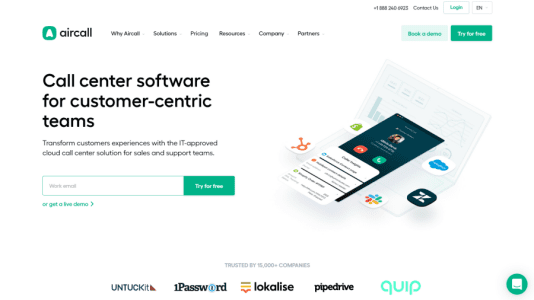



Aircall isn’t a CRM. Let’s get that straight upfront. It’s a cloud phone system — a VoIP call center you set up in minutes without buying a single piece of hardware. What makes it relevant on a CRM site is exactly how tightly it plugs into your CRM stack.
If your sales reps make a lot of calls, you already know the problem: calls happen outside the CRM, notes get forgotten, and by the time someone logs what was said, half the detail is gone. Aircall solves that. Calls are made from inside your CRM interface, recordings are attached automatically to contact records, and activity is logged without anyone having to remember.
We tested Aircall as a complement to HubSpot and Salesforce setups. Here’s what we found.
First Impressions: Setup Takes About 15 Minutes
Onboarding is genuinely fast — even by SaaS standards. The setup wizard walks you through picking phone numbers (from 100+ countries), creating teams, setting business hours, and configuring welcome messages and call routing. No IT department required.
The system runs as a browser app, a desktop app (Mac/Windows), and a mobile app (Android / iOS). You can switch between them freely — useful for reps who switch between desk and on-the-go throughout the day.
Call quality in our testing was clear and consistent. No lag, no drop-outs on standard broadband. The interface is clean and uncluttered — a new agent could be taking calls within an hour of being added to the system.
Key Features
CRM Integration — The Main Event
This is where Aircall earns its place in any review on a CRM site. Native integrations exist for Salesforce, HubSpot, Zendesk, Pipedrive, Intercom, Slack, and Microsoft Teams.
In practice, that looks like this: a sales rep gets an inbound call, and Aircall automatically pulls up the caller’s CRM contact card — with the full interaction history. After the call, the recording and any notes the rep added sync to the CRM record without any manual logging. For outbound calls, reps can dial directly from a HubSpot or Salesforce contact — no copy-pasting numbers.
That’s the workflow improvement most sales managers are actually looking for. [INTERNAL LINK: best CRM for sales teams]
One gotcha: full Salesforce integration (including custom field syncing and advanced activity logging) requires a higher-tier plan. The entry plan gets you basic call logging, but not the deeper sync.
Call Queuing and Routing
Aircall handles inbound call distribution cleanly. You can set up routing rules based on team, agent availability, or time of day. When all agents are busy, calls queue with hold music rather than bouncing to voicemail — a basic feature, but one that matters for support teams managing peak volumes.
IVR (Interactive Voice Response) menus let callers self-select their department: “Press 1 for sales, 2 for support.” Setup is straightforward and doesn’t require any technical knowledge.
Call Recording
All calls can be recorded automatically or on-demand. Recordings are stored in Aircall and — when CRM integration is active — attached to the relevant contact or deal record. Useful for training, dispute resolution, and reviewing sales calls for coaching.
Analytics and Reporting
The analytics dashboard tracks inbound and outbound call volume, average wait time, answer rates, average call duration, and per-agent statistics. Nothing exotic, but enough for a team manager to spot underperformance or identify peak-load periods.
Advanced reporting features (custom dashboards, longer data retention, team-level breakdowns) are reserved for higher-tier plans.
Missed Call Management
Aircall flags missed calls immediately and makes it easy to assign follow-ups to agents. Reps can leave notes on missed calls before returning them — small detail, but it prevents the “I thought you were handling that” confusion.
Scalability
Adding new users, numbers, or modifying routing rules is self-serve. No support ticket required. For fast-growing teams, that matters — you’re not waiting on a vendor to provision new seats when you hire a cohort of new reps.
Who Is Aircall For?
Sales teams making outbound calls. If your reps are doing heavy prospecting by phone, Aircall’s CRM sync means every call is automatically logged in your pipeline. Combine it with a CRM like Pipedrive or HubSpot and you get full call activity against every deal — without relying on your reps to do the logging manually. [INTERNAL LINK: Pipedrive review] [INTERNAL LINK: HubSpot review]
Customer support and success teams. Call routing, queuing, and transfer features make Aircall a workable helpdesk phone layer. Agents pick up calls with the customer’s history already on screen; escalations can be transferred with a note attached.
Distributed and remote teams. Because everything runs through an app — no physical desk phones — it doesn’t matter where your reps are sitting. A team spread across three time zones can operate as a single phone system, with routing rules handling the handoffs.
E-commerce and SaaS companies. Aircall is popular in both — fast order support, inbound sales, and technical helpdesk are all reasonable fits. Companies like Glovo, Deliveroo, and Pipedrive have used it at scale.
Not a great fit for: Enterprise teams with hundreds of agents (you’ll hit the ceiling of what Aircall’s analytics and admin tools can handle) or very early-stage startups where the per-user cost adds up fast with a small team. [INTERNAL LINK: best CRM for small business]
Pricing: What You Actually Pay
Aircall uses per-user, per-month pricing. Plans start from $14.90/user/month on annual billing. Monthly billing is available but costs more per seat — the annual discount is meaningful enough that most teams lock in annually.
What’s included across all plans:
- Unlimited inbound and outbound calls
- Phone numbers in 100+ countries
- Desktop and mobile apps
- Core CRM integrations
- Call recording
- Basic analytics
What requires a higher plan:
- Full Salesforce integration with advanced field syncing
- Advanced analytics and custom reporting
- Extended call recording retention
- Custom roles and permissions
- Priority support
Hidden costs to watch for:
Extra phone numbers beyond what’s bundled in your plan cost extra — factor this in if you need multiple country numbers or department-specific lines. International call minutes can generate overage charges depending on your plan and destination. Custom integrations via API aren’t a feature you just turn on — if you need Aircall connected to a non-standard internal system, expect development time or a third-party connector cost.
Pricing is listed in USD (and sometimes EUR depending on your region). The annual commitment is worth it, but it does mean a larger upfront outlay.
Pros and Cons
Pros:
- Setup takes minutes — no hardware, no IT ticket, no implementation project
- CRM integrations are deep and reliable; call data lands in your CRM without manual work
- Call quality is consistently clear on standard broadband
- Works across browser, desktop, and mobile — reps aren’t tied to a desk
- Per-user pricing scales predictably as the team grows
- Analytics give managers enough visibility to spot problems
Cons:
- Entry plan has limited customization — advanced CRM sync and reporting require upgrading
- Mobile app has a history of occasional bugs and crashes according to user reviews on G2 and Capterra
- Per-user cost can add up quickly for very small teams or early-stage startups
- No free plan — the trial is 14 days, which is enough to evaluate but requires a decision deadline
User Ratings (Third-Party)
| Platform | Score | Reviews |
|---|---|---|
| G2 | 4.3/5 | 1,200+ |
| Capterra | 4.2/5 | 500+ |
| GetApp | 4.2/5 | 450+ |
| Trustpilot | 3.7/5 | 900+ |
The Trustpilot score is notably lower than the software-specific review sites. This pattern usually reflects a mix of billing complaints and customer support experiences rather than the product itself — a pattern we see across SaaS tools. G2 and Capterra ratings (from verified software users) are the more relevant signal for evaluating whether the product works.
Users consistently praise call quality, ease of setup, and CRM sync reliability. The recurring complaints are around the mobile app and support responsiveness when issues occur.
Alternatives
- Dialpad — if you want deeper AI features (real-time transcription, call summaries, live coaching prompts). Slightly more expensive but worth evaluating for coaching-heavy sales teams.
- RingCentral — if you need a full UCaaS platform (video, messaging, phone in one). Better fit for larger organizations that want one vendor for all comms.
- Twilio — if you want to build a custom phone solution via API. More flexibility, but requires developer resources. Not plug-and-play.
- CloudTalk — if you’re comparing on price or need more European number coverage. Frequently mentioned as the closest direct competitor to Aircall.
Verdict
Our score: 4.2/5
Aircall is the right choice if your team makes a lot of calls and you want those calls to live inside your CRM automatically. The CRM integration story is genuinely good — not “we have a Zapier connection” good, but native, reliable, and worth the price tag on its own.
It’s not the cheapest option and it’s not the most feature-rich for large enterprise call centers. But for SMB sales teams (5–150 reps) using HubSpot, Salesforce, or Pipedrive as their source of truth — and who are currently suffering from patchy call logging — Aircall is a clean, fast-to-deploy solution.
Choose Aircall if: You run a sales or support team that does significant call volume, you’re already on a CRM that Aircall integrates with, and you want call activity logged automatically without changing your reps’ workflows.
Skip Aircall if: Your team makes very few calls (the per-user cost won’t be worth it), you need enterprise-grade reporting out of the box, or you’re on a very tight budget and need a free tier.