
If your sales team is tracking leads in a spreadsheet, you already know what happens. Leads go cold because nobody followed up. Deals slip through because the handoff from marketing wasn’t clean. You find out three weeks later that a prospect signed with a competitor because they never got a callback.
That’s a lead management problem. And a CRM is how you fix it.
But not all CRMs handle lead management equally – and a lot of teams choose a CRM without understanding what lead management actually requires. We’ve tested the main contenders. This guide covers what lead management in a CRM actually means, what the process looks like, what features to look for, and which tools do it best for small and mid-sized sales teams.
What is lead management in a CRM?
Lead management in a CRM is the process of capturing, tracking, qualifying, and nurturing potential customers from first contact through to a closed deal. The CRM is the central system where all lead data, interactions, and pipeline stages live – replacing spreadsheets and disconnected inboxes.
When it works, a sales rep can open the CRM, see every lead, where each one is in the process, when they last made contact, and what the next action is. No chasing down emails. No asking a colleague “did anyone follow up with that company from last Tuesday’s webinar?”
Lead management vs. CRM – is there a difference?
People use the terms interchangeably, and mostly that’s fine. But there’s a real distinction worth understanding.
A standalone lead management system focuses narrowly on one job: moving prospects toward a purchase. Think of it as a conveyor belt for new business – leads go in one end, customers come out the other. Tools like noCRM.io are built around this idea.
A full CRM manages the entire customer lifecycle. That includes lead management, but it keeps going – post-sale account management, customer support, renewal tracking, upsell opportunities. Salesforce, HubSpot, and Pipedrive all sit in this category.
For most SMBs, a full CRM with strong lead management features is the better call. You get both jobs done without paying for two separate tools or stitching together integrations.
Why spreadsheets fail as lead management tools
Spreadsheets are how most teams start. They’re free, flexible, and everyone knows how to use them. The problem isn’t the tool – it’s that spreadsheets don’t push back.
They don’t remind you to follow up. They don’t tell you when a lead goes cold. They don’t track whether an email was opened or a demo was scheduled. Every insight requires someone to manually update a cell, and that never happens consistently.
According to Harvard Business Review, the first five minutes after a prospect makes contact are critical for conversion rates. A spreadsheet has no mechanism to enforce that. A CRM does – through automation, reminders, and lead routing that gets the right rep on a call before the lead goes cold.
The lead management process: 5 key stages
Understanding the process matters because your CRM should map to it – not the other way around. Here’s how it works in practice.
1. Lead capture
Before you can manage a lead, you need to collect them. Lead capture means pulling contact information from every channel where prospects find you: website forms, landing pages, email campaigns, LinkedIn, trade shows, inbound calls, and referrals.
A good CRM automates this. When someone fills out a form on your website, they appear in the CRM automatically with source data attached. No manual entry, no missed contacts. Most CRMs connect to popular form tools (Typeform, Gravity Forms) and have native web form builders.
2. Lead qualification and scoring
Not every lead deserves immediate sales attention. Lead qualification is how you decide which ones do.
Lead scoring assigns a number to each lead based on fit and intent. Positive signals add points: matching your ideal customer profile, opening emails, visiting your pricing page, requesting a demo. Negative signals subtract them: wrong company size, wrong industry, no stated budget.
Leads above your threshold get passed to a rep. Everyone else stays in nurture sequences until they’re ready. Done well, this means your reps spend time on the 20% of leads that will generate 80% of your revenue – not chasing every contact equally.
3. Lead nurturing
A lead that isn’t ready to buy today might be ready in three months. Lead nurturing is how you stay in contact without being annoying about it.
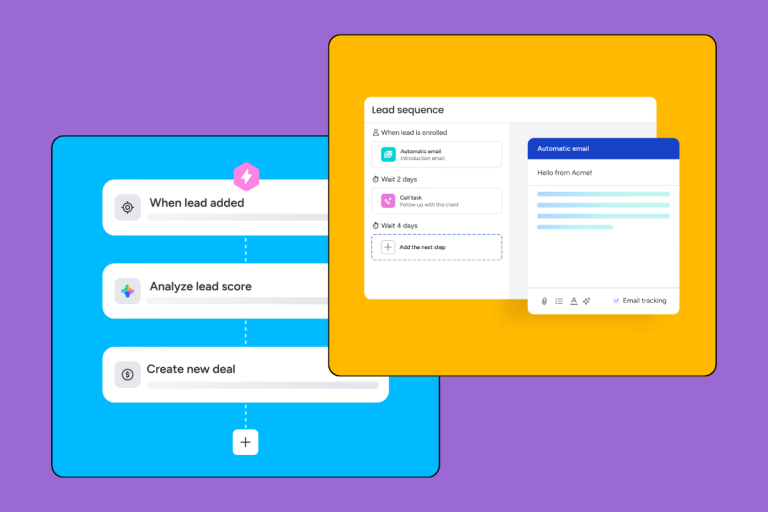
This is where email sequences, content sends, and follow-up calls come in. The CRM should let you set up automated touchpoints that trigger based on behavior (visited the pricing page again? trigger a follow-up email from the assigned rep) or time (no contact in 30 days? send a check-in).
The goal isn’t volume. It’s relevance at the right moment.
4. Lead routing and assignment
When a lead hits your qualification threshold, it needs to land with the right rep immediately. Lead routing automates this – assigning leads based on territory, industry, product line, rep capacity, or round-robin logic.
Manual assignment is one of the fastest ways to lose a lead. A qualified contact sits in an unassigned queue for two hours while your competitor’s rep picked up the phone forty minutes ago. Routing removes that gap.
5. Reporting and optimization
The final stage is how you improve. Your CRM should answer questions like: Where do most leads come from? Which sources convert at the highest rate? Where in the pipeline do we lose the most deals? How long is our average lead-to-close time?
Without reporting, you’re optimizing blind. With it, you can double down on what works and cut what doesn’t – systematically, not by gut feel.
Must-have lead management features in a CRM
Not all CRMs are built for lead management. Some are contact databases with a pipeline bolted on. Here’s what actually matters.
Lead capture and integrations
Your CRM needs to pull leads from wherever they come from – forms, email, social, chat, phone. Look for native integrations with your existing tools or a Zapier connection that covers the gaps. Manual import as a fallback is fine, but it shouldn’t be the primary method.
Lead scoring
Basic lead scoring (manual score assigned by a rep) is available in most CRMs. Automated scoring based on activity is where tools diverge. If you have volume – more leads than reps can individually assess – automated scoring isn’t optional.
Pipeline visualization
You need to see every lead, in every stage, at a glance. A visual pipeline (Kanban-style cards or a list view with stage columns) makes it easy to spot stalled deals and act on them. The best implementations let you filter by rep, source, date, and custom fields.
Automation and follow-up sequences
Automated reminders, task creation, and email sequences are what prevent leads from going cold. The minimum viable version: a CRM that reminds reps when a lead hasn’t been contacted in X days. The better version: triggered email sequences that run automatically based on lead behavior.
Reporting and analytics
Lead source reporting, conversion rates by stage, average time in pipeline, and rep activity tracking. These aren’t nice-to-haves – they’re how you know if your lead management process is working.
Best CRMs for lead management in 2026
Based on our testing, here’s how the main options stack up for SMB lead management.
| CRM | Best For | Starting Price | Free Plan | Lead Scoring |
|---|---|---|---|---|
| Pipedrive | Visual pipeline, sales teams | ~$14/user/mo | No (14-day trial) | Add-on |
| HubSpot | Free option, marketing-led teams | Free (paid from $15/mo) | Yes | Yes (paid) |
| Monday CRM | Team visibility, collaborative sales | ~$12/user/mo | No (trial) | Yes |
| Freshsales | AI-powered scoring | $9/user/mo | Yes (limited) | Yes (AI) |
| ActiveCampaign | Nurture automation | ~$15/mo | No (trial) | Yes |
Pipedrive – best for visual pipeline and sales teams
Pipedrive is built around one idea: salespeople should spend time selling, not administering a CRM. The visual pipeline is the best we’ve tested for tracking leads through stages. Drag and drop a card to advance a deal. Add notes, calls, and emails to a lead in seconds.
Lead management specifically: Pipedrive’s LeadBooster add-on adds web forms, a chatbot, live chat, and a prospecting tool. Leads captured through LeadBooster feed directly into the pipeline without manual input.
The catch: automated lead scoring requires the add-on or a third-party integration. And if you’re a marketing-heavy team that needs email automation baked in, you’ll either need the higher plan or a separate tool.
Who it’s for: Sales-focused teams of 3–50 people who run outbound or follow up on inbound leads directly. Wrong fit for marketing-driven lead gen that needs deep automation at the free tier.
Read our full Pipedrive review
HubSpot – best free option
HubSpot’s free CRM is genuinely useful for lead management, not just a feature-limited teaser. You get unlimited contacts, deal tracking, email integration, and a basic form builder at no cost. Lead scoring, sequences, and workflow automation live behind the paid Marketing and Sales Hub tiers – but the free version covers the fundamentals for early-stage teams.
Who it’s for: Teams that are just starting to formalize their lead process and aren’t ready to pay for a full CRM stack. Also strong for marketing-led teams already using HubSpot for email or ads.
Monday CRM – best for team visibility
Monday CRM’s strength is visibility. Every rep, manager, and team lead can see the full pipeline in a shared view with custom fields and filters. Lead management flows naturally for teams that are collaborative by nature – marketing, sales, and ops all working in the same system.
Lead scoring and automation are solid at the mid-tier plans. The interface takes adjustment if your team is used to more traditional CRM layouts, but the onboarding is one of the better ones we’ve seen.
Who it’s for: Teams of 5–30 where multiple people need to see and update lead status. Less ideal for solo salespeople or teams that want a lean, focused sales tool.
Read our full Monday CRM review
Freshsales – best for AI-powered lead scoring
Freshsales (part of Freshworks) has the best out-of-the-box AI lead scoring we’ve tested at this price point. Freddy AI – their built-in scoring engine – analyzes lead behavior and gives each contact a score and a deal prediction without manual setup. For teams with lead volume, that’s a real time-saver.
The rest of the CRM is solid: web forms, email tracking, built-in phone, and solid automation. The free plan is limited but functional.
Who it’s for: Sales teams handling 50+ leads per month who want automated scoring without a complex setup. Strong for B2B SaaS or services businesses with a defined qualification process.
Read our full Freshworks review
ActiveCampaign – best for nurture automation
ActiveCampaign isn’t a traditional CRM – it’s closer to a marketing automation platform that includes CRM functionality. That makes it overkill for pure sales lead management. But if your business depends heavily on lead nurturing – email sequences, behavioral triggers, multi-step campaigns – it’s the strongest tool in this list for that specific job.
Who it’s for: Teams where marketing and sales are tightly integrated and lead nurturing is a significant part of the revenue process. E-commerce, B2C services, or B2B with long sales cycles. Not ideal for high-velocity outbound sales.
Read our full ActiveCampaign review
For a full ranked comparison, see our best sales CRM roundup.
How to set up lead management in your CRM (step by step)
Once you’ve picked a CRM, here’s how to build the process.
Step 1: Define your lead stages. Map out exactly what each stage means in your pipeline – from “new contact” to “qualified” to “proposal sent” to “closed won.” Make the definitions explicit so every rep uses them the same way.
Step 2: Set up lead capture. Connect your forms, landing pages, and any manual import sources. Test that a form submission creates a lead record correctly in the CRM before you go live.
Step 3: Build your scoring system. Start simple. Assign points for the 3–5 signals that correlate with your best customers: company size match, visited pricing page, opened a certain number of emails. Adjust thresholds after 30–60 days of data.
Step 4: Create your nurture sequences. Write 3–5 email templates for leads that aren’t ready to buy. Set up the automation so they send on a schedule or based on behavioral triggers. Don’t make them aggressive – leads remember how they were treated before they were ready.
Step 5: Set up reporting. Create a weekly pipeline review that shows lead volume by source, conversion rates by stage, and any leads that have sat in a stage too long. Review it every Monday. Act on what you find.
FAQ
What is lead management in CRM?
Lead management in a CRM is the process of capturing, tracking, qualifying, and nurturing potential customers from first contact through to a closed deal. The CRM acts as the central system where all lead data, interactions, and pipeline stages live – replacing spreadsheets and disconnected inboxes.
Is a lead manager the same as a CRM?
Not exactly. A standalone lead management system focuses narrowly on converting prospects into customers, while a full CRM manages the entire customer lifecycle – including post-sale relationships, support, and retention. For most SMBs, a CRM with solid lead management features covers both jobs without the cost and complexity of two separate tools.
What CRM is best for managing leads?
Pipedrive is our top pick for sales-focused lead management – its visual pipeline makes it easy to track every lead without losing anything. HubSpot is the best free option. Monday CRM works well for teams that need shared visibility across a pipeline. Freshsales leads on AI-powered lead scoring. ActiveCampaign is the strongest for nurture automation.
What is lead scoring and how does it work?
Lead scoring assigns a numerical value to each lead based on their likelihood to convert. Points are added for positive signals – opened emails, visited pricing page, matches your ideal customer profile – and subtracted for negative ones like wrong industry or no stated budget. Leads above a set threshold get passed to a rep; lower-scored leads stay in nurture sequences until they warm up.